AI detector for teachers
Check a submission with Syft Detect and read the exact passages behind the signal, each with the writing feature that drove it. Enough to know where to look, and stated plainly enough to know what it does not settle.
Published Syft
Drop a Word document here
.docx is opened on this page and its text is checked below. .txt and .md are read as text. A PDF is read for metadata only: PDF text extraction is not available yet.
0 words · 0 characters
Free analysis. A free account is needed to view and save the result. Your text is encrypted while it waits and is deleted if you don’t open it.
Syft AI
Ready when you are.
Paste at least 120 words for a meaningful estimate.
- The same Syft AI analysis, on every plan
- Passage-level evidence, not just a number
- Free account to view and keep the result
What a result shows you
A band tells you to look. The passages tell you where.
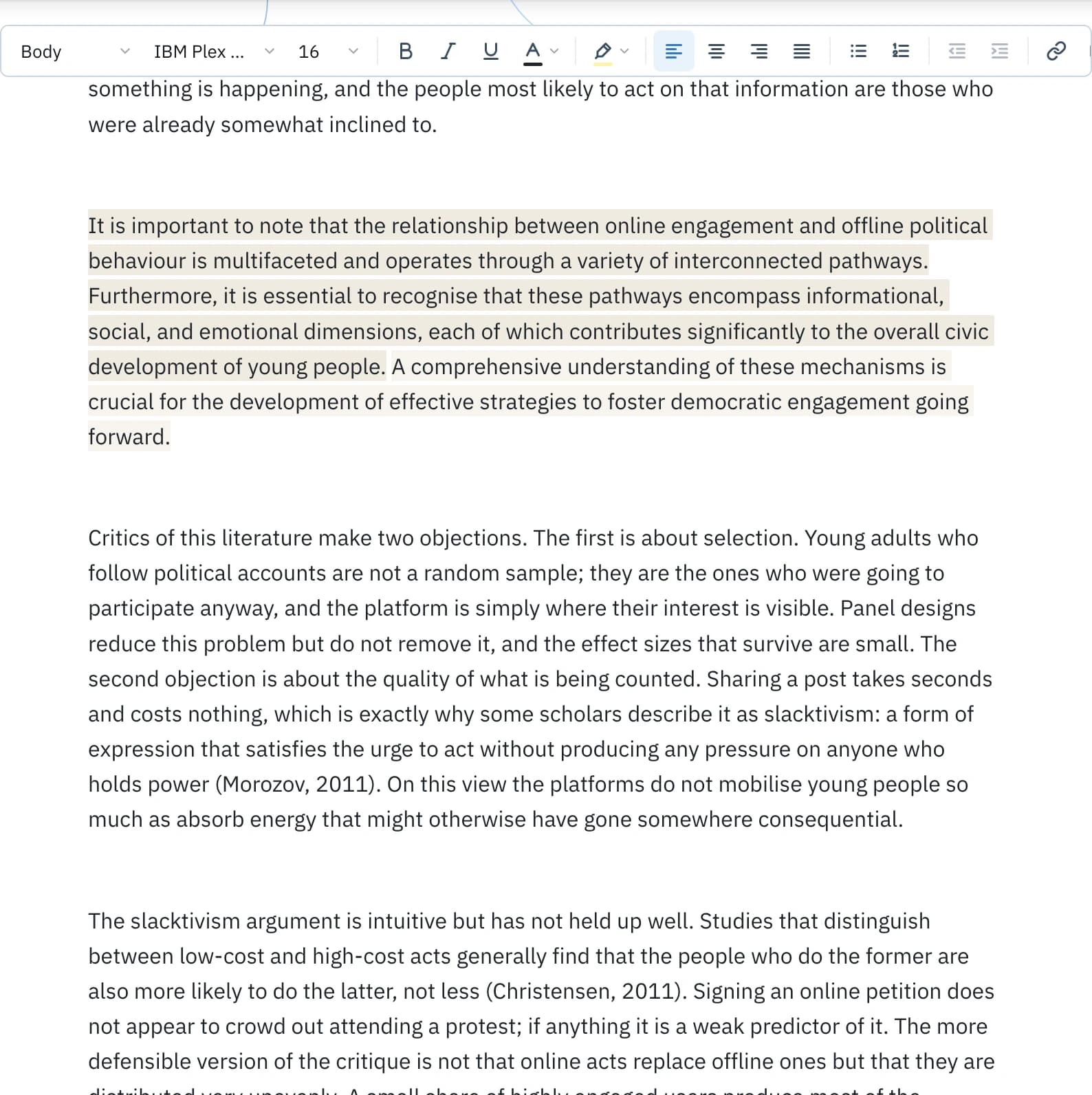
Syft marks the sentences carrying AI-like signals on the submission itself and names the features that drove each one. That detail is what separates a stiff, formulaic piece from a careful writer's formal register, when the two read the same overall.
So read them. If the marked sentences are the writer’s own specific claims and examples, weigh the reading down. If they are generic framing and summary, that is what Syft responded to, and it is also what a conversation about the writing can address.
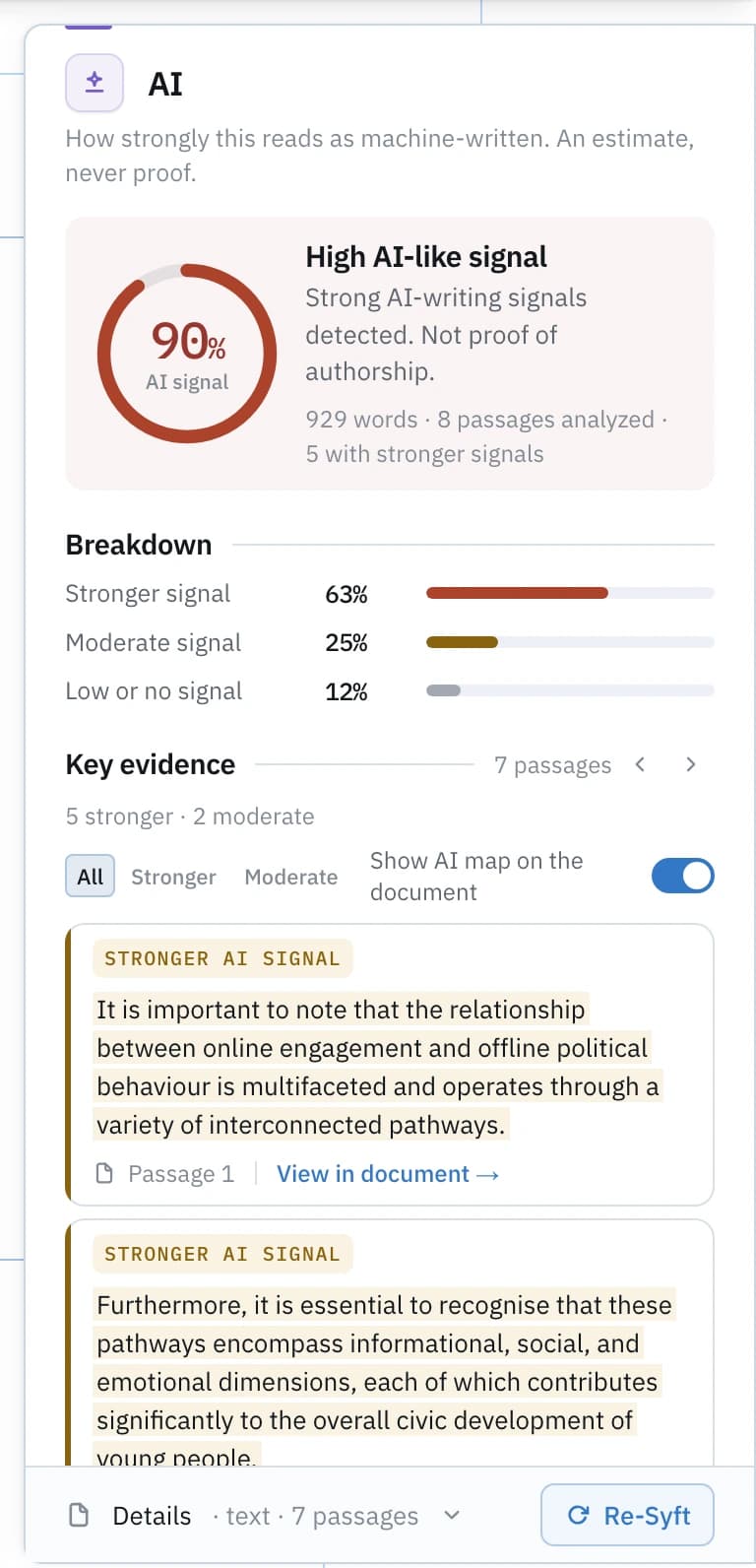
AI-writing signal band · High signal
3 of 9 sentences in a sample document carry the signal. Read live by Syft’s engine on this page.
Passage-level inspection
See where the signal comes from.
The AI map draws the reading on the submission itself: the marked sentences, the feature behind each one, and the unmarked rest left plainly unmarked.
Using a result with a student
Evidence first, conversation second, decision last.
A reading is a good reason to look closely. Here is how to get from it to a decision you can stand behind.
- 01
Read the marked passages
Decide for yourself whether they read as generic framing or as the student's own argument. The reading is only as good as this step. - 02
Look at the file, not just the text
A document records its own history: author fields, timestamps, revision counts, editing time. Absent or odd values are questions, not answers. - 03
Ask for process evidence
Drafts, notes, sources, version history. A student who wrote the piece can usually show how it grew; that shows more than any reading can. - 04
Compare, if you have drafts
The workspace compares versions. A reading that moves as the draft develops tells a different story from one that appears whole. - 05
Keep the reading in proportion
It is one input, uncertain by nature, with documented false positives for formal and non-native writing. It should not be the sole basis for an academic decision. - 06
Decide on the whole record
The conversation, the process evidence and the assignment's rules carry the decision. The reading told you where to look.
False positives
Some human writing reads as AI-like.
The features any detector measures are properties of prose, and some human prose has them. Worth planning for before a reading is in front of you.
OBSERVEDPublished research on AI-text detectors as a class reports false positives on human writing, degraded accuracy on paraphrased text, and markedly higher false-positive rates for non-native English writers.
UNKNOWNSyft has not yet published a measured accuracy or false-positive rate for its own detector. No figure is stated here because no approved measurement of the production engine exists. When one does, it will appear in this place with its engine version, method, sample, date and limitations.
References
- 01Testing of detection tools for AI-generated text Weber-Wulff et al., 2023 · International Journal for Educational Integrity · 2023
- 02GPT detectors are biased against non-native English writers Liang et al., 2023 · Patterns · 2023
In the workspace
The whole file, every lens, kept.
An account opens a submission as an item you keep: the AI map on the text, what the file records about itself, the privacy exposure it creates, and Compare across a student's drafts.
It is the same workspace a student uses before handing the piece in. The Syft for students page is the fuller account of it: the signals, the writing tools, the file’s own record, and the evidence of drafting that answers an authorship question better than any reading can.
Questions
What teachers ask.
- Can an AI detector tell me whether a student used AI?
- Syft Detect marks the passages whose writing carries AI-like patterns and names the features behind each one, so you can see what drove the reading and where to look. What it measures is the writing, not the writer: a detector result is not proof of authorship.
- What should I do with a high reading?
- Read the marked passages, then talk to the student about how the piece was written. Drafts, notes and version history show process in a way no reading can, which is why the conversation carries more than the reading does.
- Can I check a Word document directly?
- Yes. Drop a .docx on this page and its text is analysed. PDFs are read for metadata only, because Syft does not extract text from PDFs yet; paste the text for those.
- Is the student's work uploaded?
- Only what the analysis needs. Text needed for detection is sent once over an encrypted connection to Syft's own servers, is never used to train a model or shared with anyone, and is deleted once you open the result or it expires unopened. See Security and Privacy for how processing and retention work.
- Is there a plan for schools?
- No. Syft is sold to individuals, on a Free plan and a Pro plan.